Multiplayer research notes
This chapter includes all research notes for workshop 1.
Fishnet research
https://fish-networking.gitbook.io/docs/tutorials/getting-started
Easy to install via asset store in unity Incompatible with Netcode for Gameobjects Both peer2peer & server based Uses (and provides) a NetworkManager to establish connections, host sessions and handle client-server communication Provides easy user interface for quick testing with NetworkHudCanvas Adds a player prefab to the NetworkManager for spawning Client authorative movement -> increased risk of cheating Can be synced with NetworkTransformComponent Objects need to be spawned or despawned Syncvars are used to synchronize variables Use networkbehaviour instead of monobehaviour for network objects Player camera can be spawned after player or placed beforehand and then claimed by a player Cinemachine recomended Fishnet uses Tugboat component for connections not on local machines
More general features in fishnet https://fish-networking.gitbook.io/docs/tutorials/getting-started/commonly-used-guides
Comparison https://docs.google.com/spreadsheets/d/1Bj5uLdnxZYlJykBg3Qd9BNOtvE8sp1ZQ4EgX1sI0RFA/edit?gid=233715429#gid=233715429
Fishnet is better in terms of performance but costs more https://www.reddit.com/r/Unity3D/comments/1mw4i6l/is_fishnet_steamworks_the_best_multiplayer/
Fishnet does not support p2p outright (although with a listen server a supernode p2p network could be achieved)
Fishnet has significantly better latency results then mirror https://fish-networking.gitbook.io/docs/overview/readme/features/performance/fish-networking-vs-mirror
https://www.reddit.com/r/Unity3D/comments/xestob/is_there_a_benchmark_comparing_the_different/
Fishnet cheaper then alternatives / free https://www.reddit.com/r/unity/comments/1e8kbyj/mirror_photon_or_netcode_for_gameobjects/
https://fish-networking.gitbook.io/docs/overview/readme/pro-projects-and-support
https://discussions.unity.com/t/best-networking-library-against-cheating-hacking-and-your-experiences/890198/3
Results of fishnet: Outscores mirror by a big margin on performance (bandwidth, fps, server performance) Fishnet + photon fusion are generally the best in terms of performance, with photon fusion being slightly better. Pro plan has lag compensation which can rollback colliders to provide more accurate collisions and network level of detail which reduces bandwith by 95%
Nearly all multiplayer frameworks maintain good levels of consistency, none is really better then the other.
In terms of scaling, fishnets free edition still support a lot of concurrent users. You still however would need to find a server to host on. Matchmaking also is not integrated into fishnet (unlike photon fusion) so you still need to implement that yourself (which gets harder the larger the scale)
Fishnet works with both server and client authority. Pro plan has automatic code stripping which removes sensitive code from clients.
Fishnet is mostly free (and even has free clientside prediction). They also offer paid plans tho with their pro plan having lag compensation, automatic code stripping and network level detail. Fishnet also has 'projects' which are basically a template including login systems and lobbies.
Conclusion: choosing a networking framework depends mostly on scale, budget and a lot of personal preference.
Netcode for DOTS research
Latency:
- Handles latency reasonably well for most small- to medium-scale games Consistency:
- Good for most gameplay, only high latency scenarios can be hard Scalability:
- Works well for moderate player counts, but scaling to massive multiplayer worlds can be challenging. Security:
- Netcode for GameObjects does not include anti-cheat measures it’s a networking framework, not a security system. Costs:
- Free to use with Unity, though server hosting and scaling can add extra costs.
sources
- Latency: (https://docs.unity3d.com/Packages/com.unity.netcode.gameobjects@2.5/manual/latency-performance.html)
- Consistency: ...
- Scalability: (https://docs.unity3d.com/6000.2/Documentation/Manual/multiplayer-overview.html)
- Security: (https://docs.unity3d.com/Packages/com.unity.netcode.gameobjects@2.5/manual/basics/connection-approval.html)
- Costs: (https://www.reddit.com/r/Unity3D/comments/y3ltip/is_unity_netcode_for_gameobjects_free/)
Features
Object spawning ensures consistency:
- Creating objects on the server makes sure all players see the same thing. Network prefab handler ensures consistency:
- It makes sure the same prefabs are used on the server and all clients, so everyone sees the same objects. Object pooling reduces latency:
- A feuture that reuses networked objects instead of creating and destroying them each time, improving performance and reducing lag. Object visibility ensures scaling:
- Controlling which objects each player sees helps the game run smoothly as more players or objects are added. Deferred despawning reduces latency:
- Delaying the removal of objects avoids network delays and keeps gameplay smooth.
Photon Fusion research
Photon Fusion is a high-end state transfer netcode SDK used to build multiplayer games. Photon Fusion is a part of Photon's many SDKs, such as Photon Quantum and Photon PUN. Photon Fusion is mostly used to make competitive games, where fast-paced and real-time synchronization between players are crucial. Since its real-time, Photon Fusion uses UDP as its transport layer as it is faster.
Photon Fusion has features such as client-side prediction, lag compensation, and tick-based simulation to enhance multiplayer experience. Photon Fusion also features replication systems, which can use either full consistency where each object is more internally consistent but uses more bandiwdth or eventual consistency where it uses less bandwidth but allows more object to be packed.
Photon Fusion users can use either a dedicated server, a hosted one, or a shared authority, where players connect with each other through Photon's relay. It synchronizes between each client's game and their specific object through Fusion, not exactly a peer-to-peer but more or less similar. Photon Fusion also enables roles between a host, client, and server, where players can either be one of them depending on the needs.
Starting Photon Fusion: https://doc.photonengine.com/fusion/current/tutorials/host-mode-basics/1-getting-started
Photon Fusion's main issues:
-
Latency : Photon Fusion has tools to test latency problems and simulate players with bad internet connection, to solve this, Photon has features such as being able to handle thousands of objects over hundreds of client connections, client-side prediction, and snapshot interpolations to provide smooth rendering even during bad connection. The tests are also done to ensure multiplayer games can run smoothly and connection between the players and the server are stable. (https://doc.photonengine.com/fusion/current/manual/testing-and-tooling/simulating-network-conditions)
-
Consistency : Photon Fusion can implement between 2 replication algorithm, which are full consistency and eventual consistency. Full consistency are where all players can see the same thing at the same time at anytime, while eventual consistency will follow up to it eventually, but it's more faster than full consistency. Features for this are tick-based simulation and lag compensation. (https://doc.photonengine.com/fusion/current/manual/data-transfer/eventual-consistency)
-
Scale : Photon Fusion supports from 20 CCU and up to 50.000 CCU. (https://www.photonengine.com/fusion/pricing)
-
Security : Photon Fusion's Infrastructure are DDos protected. (https://doc.photonengine.com/fusion/current/manual/advanced/encryption) (https://doc.photonengine.com/realtime/current/connection-and-authentication/secure-networks)
-
Cost : The cost to run a server in Photon Fusion increases with the amount of CCU, Photon Fusion offers free CCU up to 100, although it's for one app only, more than that will start to cost you, with billings hitting you per month. (https://www.photonengine.com/fusion/pricing) (https://www.photonengine.com/fusion/pricing-industries)
SpacetimeDB research
- A breakthrough in game dev - SpacetimeDB 1.0
- How to Code Your Own Minecraft Server! - Part 1
- SpacetimeDB main website
- SpacetimeDB Unity docs
- SpacetimeDB benchmarking tool
- Row level security
Latency
- Traditional DB round-trip time? 400 microseconds to 10ms. SpaceTime DB? <1 microsecond
Consistency
Scale
- Maincloud is designed for 1000+ concurrent clients on a single database instance
- SpaceTime DB runs server-side code inside the database itself, removing the need for separate application servers.
- Vertical Scalability for the Standalone version
- Horizontal scaling in enterprise
- Serverless scaling resource in maincloud
Security
- Technical safeguards
- Implementation in Rust provides memory safety.
- Server-side code runs in sandboxed WebAssembly environments for isolation.
- Application-level security
- Custom authorization logic via reducers, enabling fine-grained access control within the database.
- Row-level security lets you specify which clients can access specific data rows.
Cost
Standalone
- Free
- Self-Hosted
Maincloud
- Pay-as-you-go
- $5/hr
- Serverless Cloud Platform
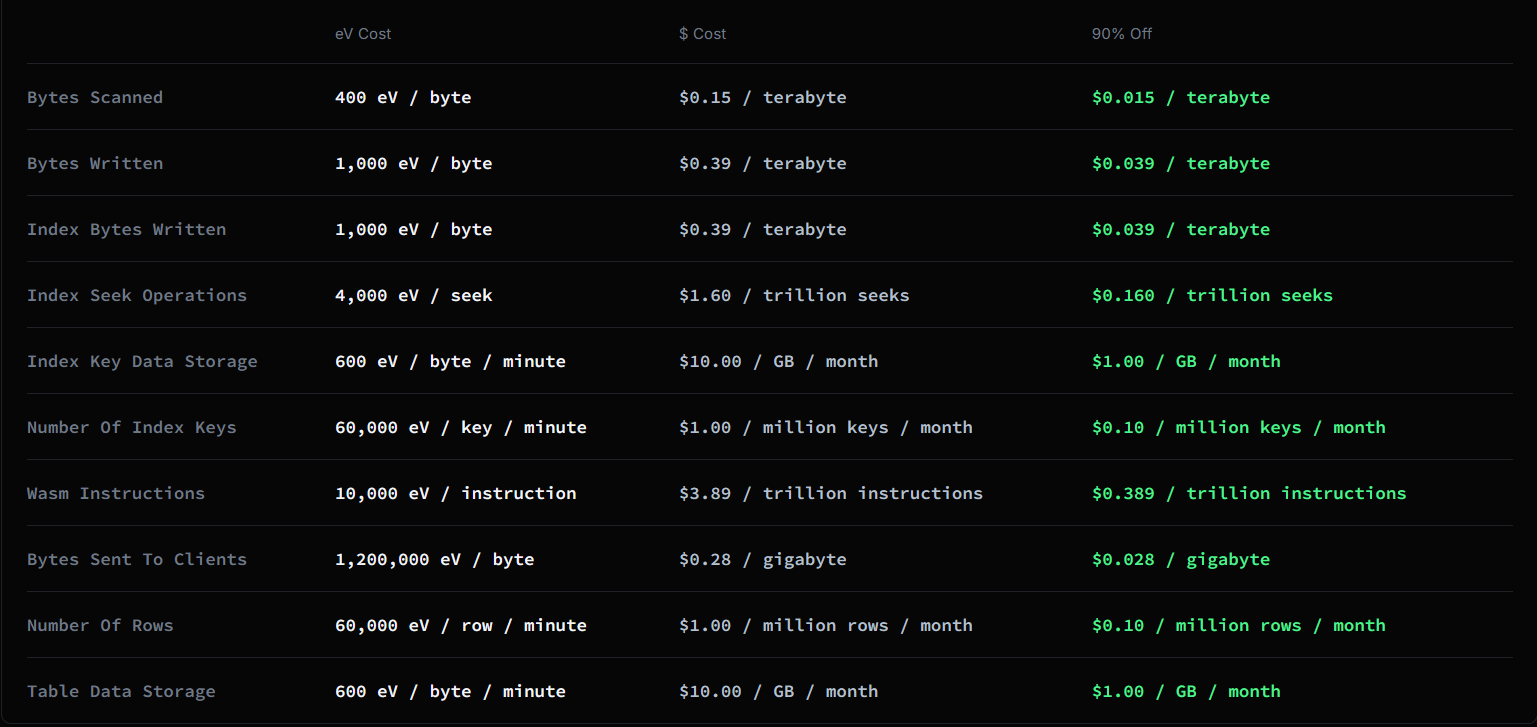
Enterprise
- Price discussed with Clockwork Labs
- Custom service for dedicated hosting
Phase 2: Multiplayer workshop
Assignments
Security
Questions
- How does Fishnet passively prevent cheats?
- What does the developer need to do to actively prevent cheats?
- Are there any cheat that Fishnet is unable to prevent?
Security demo features
- Players are spawned in an arena with walls and ramps
- Players are assigned speed, health, attack values, and shooting speed
Latency
Latency questions
- How does network latency affect player movement synchronization?
- How does latency affect hit detection?
- What happens when a player picks up an item with high latency?
- What happens if the client (with low latency) and another client (with high latency) disagree on an action’s timing?
Latency demo features
- Two players in a small arena (server and client)
- One player has artificial latency (e.g., 200–500ms)
- All players can move, jump, shoot, and pick up items (like health packs)
- Simple health and respawn system implemented
- Visual indicators (“Ping: XXX ms”) for clarity
Answers
Security
1. Fishnet has Client-Side Prediction features, it doesn't fully prevent cheats but it reduces the opportunity to do so
Client-Side Prediction (CSP) allows the client to move in real-time while also ensuring they cannot cheat. It works by having the client locally react to user input before the server acknowledge the input and update the game state. CSP also reduces latency problems, in which case also reduces the visual feedback time. For example, if a client tries to speedhack, server rejects the client's new position and instead moves as inputted originally. If it's the client's speed, max movement speed can be implemented.
=> Player movements and actions will be in sync visually, whether it's client or host.
2. The developer needs to make the server authoritative for all critical state, such as health and attack
By making the server authoritative, which means that server is the one that holds any power to write and change any inputs or updates. Clients would need to send requests to make those updates, and if the server deems those changes illogical or impossible, the server can reject those.
=> Changes to clients will be updated accordingly by the server.
3. Cheats that doesn't rely on modifying client-side game state or outside the client process
Both Fishnet and developers won't be able to prevent all the cheats that exist, but can prevent most of them. Cheats such as DDoS-ing or ones that use hardwares would need other kinds of modes to prevent those, like using BattlEye and Cloudflare.
=> Highly unlikely but can prevent DDoS attacks and other cheats that is outside of the game state.
Latency
1. Movement Synchronization
- On client #1 (low latency), movement feels instant.
- On client #2 (high latency), movement appears delayed and slightly jerky due to network lag.
2. Hit Detection
- On client #1 (low latency), hits are registered accurately.
- On client #2 (high latency), shots may appear to miss because the client sees outdated positions of other players.
3. Item Pickup
- On client #1 (low latency), items are picked up and disappear immediately.
- On client #2 (high latency), there is a short delay before the item disappears.
4. Server-Client Disagreement
- The server is authoritative: its version of events overrides the clients.
- If a client believes they are behind cover, but the server sees them exposed, the server enforces the damage calculation, and the player still takes damage.